¶ Hosting on a single domain with Traefik
Using the same (sub)domain for both the API and the UI is not officially supported. The setup is quite scuffed and tricky. Here's a working docker-compose.yml that implements this using Traefik as the reverse proxy.
services:
  minio:
    image: docker.io/bitnami/minio:2025
    restart: unless-stopped
    hostname: minio
    expose:
      - 9000
      - 9001
    networks:
      - traefik
    volumes:
      - ./data:/bitnami/minio/data
    environment:
    	# TODO: set other variables required by minio
      MINIO_BROWSER_REDIRECT_URL: https://s3.example.com/minio
    labels:
      traefik.enable: true

      traefik.http.routers.minio.entrypoints: https
      traefik.http.routers.minio.tls.certresolver: pertls
      traefik.http.routers.minio.rule: Host(`s3.example.com`)
      traefik.http.routers.minio.service: minio
      traefik.http.services.minio.loadbalancer.server.port: 9000

      traefik.http.routers.minio-ui.entrypoints: https
      traefik.http.routers.minio-ui.tls.certresolver: pertls
      traefik.http.routers.minio-ui.rule: Host(`s3.example.com`) && PathPrefix(`/minio`)
      traefik.http.routers.minio-ui.service: minio-ui
      traefik.http.routers.minio-ui.middlewares: minio-ui-replacepath@docker
      traefik.http.services.minio-ui.loadbalancer.server.port: 9001
      traefik.http.middlewares.minio-ui-replacepath.stripprefix.prefixes: /minio


networks:
  traefik:
    external: true
The only caveat of this approach is that you must open https://s3.example.com/minio/minio in your browser manually. Using https://s3.example.com/minio will not work - the page will be empty.
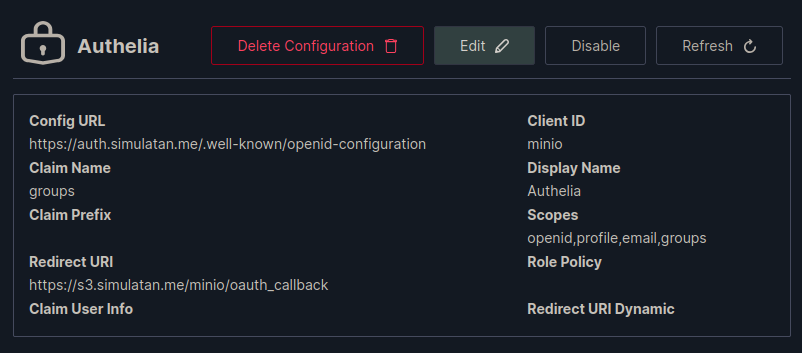
¶ OIDC Config
Go to Identity -> OpenID and create an entry for Authelia.